
Latest release of BearSDK brings many improvements and better practices to make your integration smoother.
General improvements
- https support.
- removed the most part of external dependencies.
- reduced size of sdk approximately twice.
- optimized unloading resources.
- removed unnecessary debug logs.
- reworked sdk initialization process.
This section describes what steps you need to follow to update your application with the version 2.0 of the BearSDK.
Update dependency version
- Update your dependency manager file
Carthage example
before:
github "Alamofire/Alamofire" "4.5.1"
github "Hearst-DD/ObjectMapper" "3.0.0"
github "ReactiveX/RxSwift" "3.6.1"
github "Swinject/Swinject" "2.1.1"
github "Swinject/SwinjectStoryboard" "1.1.2"
github "marketplacer/keychain-swift" "9.0.2"
github "onevcat/Kingfisher" "4.1.0"
github "realm/realm-cocoa" "v2.10.2"
after:
github "Alamofire/Alamofire" "4.6.0"
github "ReactiveX/RxSwift" "4.1.1"
- update manually
BearSDK.frameworkfile and removeBearGL.frameworkfrom embedded binaries.
Starting version 2.0BearSDKandBearGLmerged together to simplify integration process.
Embedded Binaries section after update: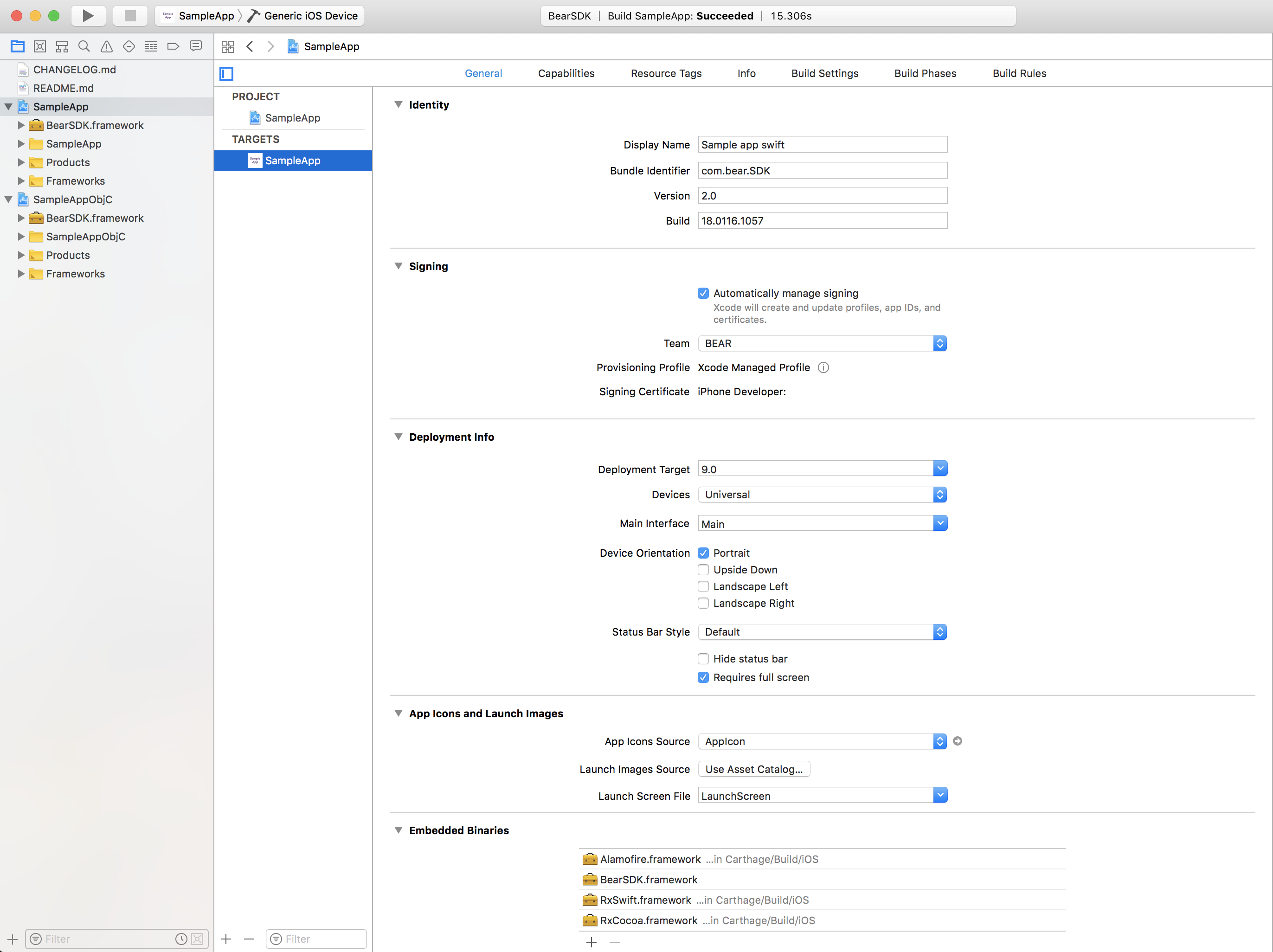
Change your application Info.plist
NSAllowsArbitraryLoads not required starting version 2.0
By default BearSDK supports content only through https. Thats why you have to use only https in BEAR Frontend.
If you want to support http at your own risk - you are able to specify NSAllowsArbitraryLoads key to true in NSAppTransportSecurity.
<key>NSAppTransportSecurity</key>
<dict>
    <key>NSAllowsArbitraryLoads</key>
    <true/>
</dict>
AppDelegate class
The config1.1.data asset resource file is not used anymore. You have to use the secret key instead which is provided by BEAR (for development process you can use the sample application one). Use this secret key as parameter in the BearSDK.set(secretKey: String) method.
You only need to initialize the BearSDK in your AppDelegate class:
func application(_ application: UIApplication, didFinishLaunchingWithOptions launchOptions: [UIApplicationLaunchOptionsKey: Any]?) -> Bool {
    try! BearSDK.set(secretKey: secretKey)
    return true
}
BearSDK class
The BearApp class renamed to BearSDK:
- added:
shared- Shared instance of BearSDK.set(secretKey:) throws- Setup secret key to configure BearSDK.destroy- Destroys all loaded BearSDK resources.preload(_ bearDidLoad: (() -> Void)?)- Preloads BearSDK resources to reduce loading time ofBearViewController.isLoaded:- The status of BearSDK resources.
- changed:
registerDevice(_ deviceToken: Data?)toregisterDevice(withDeviceToken token: Data)getDeviceIdtodeviceId
- removed:
init?(withUserConfig:)- usesharedinstead.getCameraViewController(onDismiss:, bearLoaded:)- useBearViewControllerinstead.getHandler:- usehandlerproperty ofBearViewControllerinstead.setMarkerCallback(_ callback:)- usedelegateproperty ofBearViewControllerinstead.
BearConfigProtocol
The BearConfigProtocol does not exist anymore, to setup timeToPause and scannerColor you have to use the same properties in BearViewController.
CameraViewController class
Since BearApp was removed and hence getCameraViewController method too, you are able to create BearViewController the way you want.
You are able to create instances of BearViewController subclasses programmatically or using Interface Builder and use those objects to provide the specific behaviors and visual appearances that you need.
Note: You are able to create multiple instances of
BearViewControlleror it subclasses, but you are not able to show them simultaneously. And keep in mind that every instance ofBearViewControlleror it subclass uses the same view for render. Be careful with view states.
MarkerCallback
The delegate of BearSDK moved from BearApp class to BearViewController. Since version 2.0 it is acceptable using delegate property of BearViewController.
MarkerCallback has been renamed to BearDelegate.
- added:
assetClicked(with assetId:)- Function will be executed on click of any asset.scannerStateChanged(_ state:)- Function will be executed when BearSDK Scanner has changed state.reachabilityStatusChanged(_ reachable:)- Function will be executed on change of reachability status.didFail(withError error:)- Function will be executed when an error occurs while the BearSDK is loading content.
- changed
noMarkerFoundtomarkerNotRecognized.
BearHandlerProtocol
The handler of BearSDK features moved from BearApp class to BearViewController. Since version 2.0 it is acceptable using handler property of BearViewController.
Changed BearHandlerProtocol:
- added:
scannerStateresumeCamera(animated:)pauseCamera(animated:)isFlashEnabledisNetworkReachable
- changed:
showShare(fromRect rect: CGRect)totakeScreenshot- now this function takes screenshot of camera view, ignoring any overlapping UI elements.startScantostartScanning.stopScantostopScanning.showMarkerInFreezedMode(id:)toshowARSceneWithoutTracking(withMarkerId id:).
- removed:
dismiss- use native dismiss functions instead.clearView- usecleanViewinstead.showMarkerInFreezedMode(targetId:)- useshowARSceneWithoutTracking(withMarkerId id:)instead.
New classes
BearErrorexposes short description, type and in some cases reason of occurred error.typeshortDescriptionreason
BearErrorTypedescribes type of occurred error.invalidSecretKeynetworkdecodingbackendspecificunknown
BearScannerStateis used to describe possible BearSDK scanner states.idlescanningprocessingrendering
BearViewControllerprovides a infrastructure for your application to manage BearScanner.timeToPausetime after that scanner will be paused.scannerColorscanning line color.disableCameraAutoHandlingdisables automatic camera handling.handlerobject to control Bear scanner features.delegateused to receive scanning callbacks.
BearViewControllerObjcthe same asBearViewControllerfor Objective-C support. Because swift forbids subclasses from swift classes.
Comments
Please sign in to leave a comment.